
Tips for Recording
subQdocs generates the best notes when it captures the entire patient experience—from the moment the medical assistant (MA) greets the patient to the moment the physician completes the exam and treatment. The tips below will help you consistently produce high-quality, reliable notes.
Tip 1: Use subQdocs across the entire visit
- Have the medical assistant start the recording when they bring the patient into the exam room.
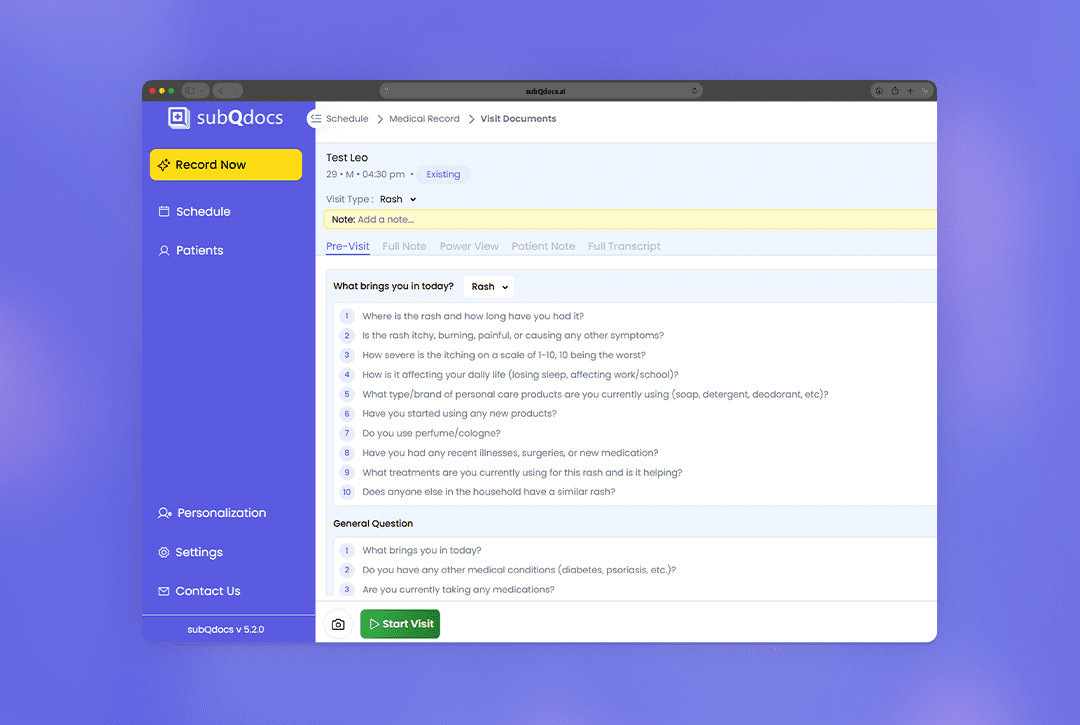
- Open the Pre-Visit tab to capture structured intake information.
- Select the Reason for Visit to load the correct dynamic question set.
- Ask the pre-visit questions and tap Create CC/HPI to generate:
- Chief Complaint (CC)
- History of Present Illness (HPI)
- Summary of previous visits
This gives the Provider a clear overview before entering the room and sets the visit up for a cleaner note.
Tip 2: Use photos to improve documentation
- During the visit, capture photos using the subQdocs app.
- Photos work on web, but are especially effective on iPad or iPhone.
- subQdocs automatically places photos into the note based on context.
Photos are especially helpful for documenting:
- Lesions
- Procedures
- Progress over time
- Pre- and post-treatment comparisons
Tip 3: Verbalize actions that have no visual cue
subQdocs cannot “see” what’s happening—it only listens. Clinical actions without verbal context will not be documented unless spoken aloud.
Examples:
- Before: “Martha, I see five SKs on your face and neck. I’m going to treat them with cryotherapy.”
- After: “Just to recap, I treated five SKs with cryotherapy today.”
Why this matters:
- Your MA can visually track lesions or procedures
- subQdocs cannot
- Clear verbal descriptions ensure accurate documentation
Tip 4: Pay attention to microphone placement
Audio quality plays a big role in how well subQdocs understands the visit.
- Laptop microphones are directional. Position the laptop so the microphone can “see” both the Provider and the patient.
- You don’t need to project your voice like you’re on a stage, but mumbling makes transcription harder.
- iPads generally do a better job capturing room audio than laptops.
- Laptops and phones still work well—just be mindful of placement and background noise.
A small adjustment to mic position can make a noticeable difference in note quality.
Additional Resources
A dermatologist, a tech visionary, and an AI expert joined forces to redefine value creation and documentation efficiency in dermatology—unlocking smarter workflows and better patient care.

Reserve your spot
Please share a few details so we can plan the evening.